Year / Release Date : 2025
Version : 2.7.04
Developer : Aurally Sound
Format : vst3, AAX
Bit depth : 64 bit
Interface language : English
Tablet : Present
System requirements :
☑ Windows 64-bit: 11, 10, 8.1
☑ Minimum CPU: Intel Core i5
☑ Minimum RAM: 8 GB
Size : 189.3 MB


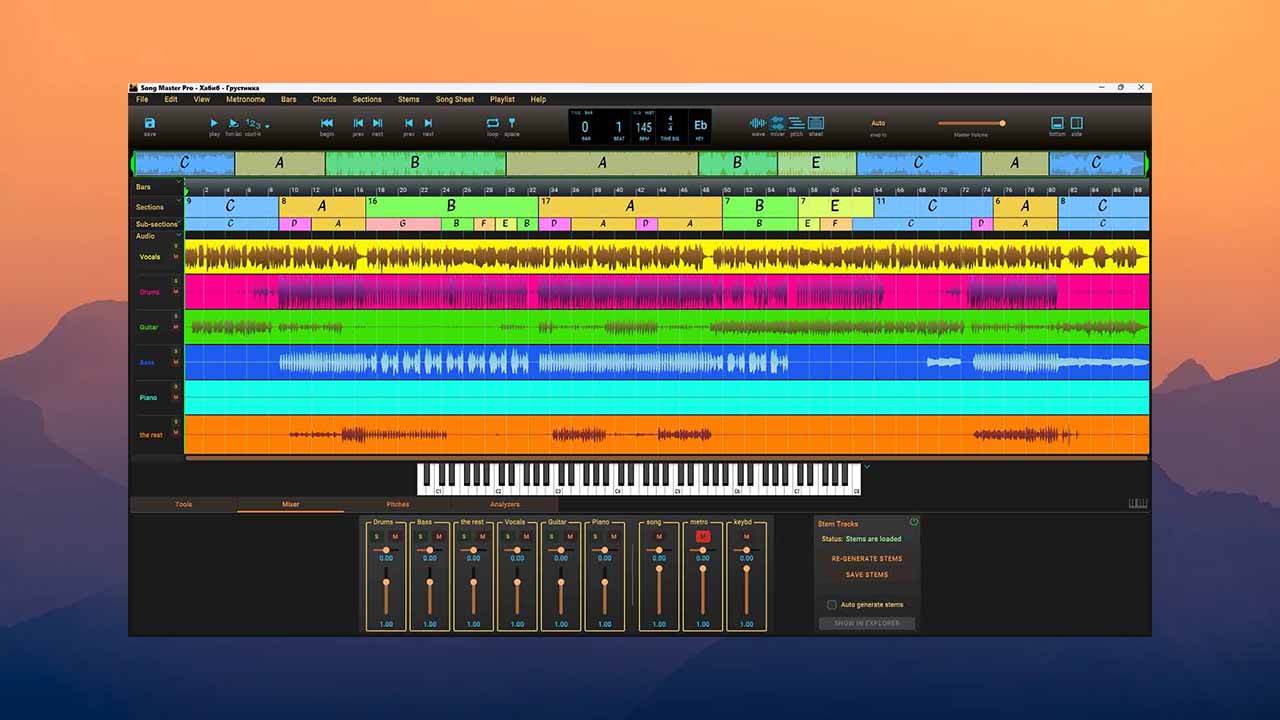
Song Master gives you the tools to learn your favorite songs directly from recordings and perform them effectively.
Song Master uses modern machine learning and deep learning algorithms to identify high-level song sections,
chords, measures, rhythms, time signatures, keys, and tunings.
What’s new?
Song Master Pro 2.7.04 – February 28, 2025
A bug crept into the Windows Song Master Pro v2.7.03 at the last minute that prevented MIDI data from the Pitches tab from displaying once it was computed.
This update fixes this issue. This bug doesn’t affect macOS builds.
Song Master 2.7.03 – February 25, 2025
Mostly Midi Command related
Fixed a few mis-labeled command names in Keyboard and Midi Mapping dialogs
Added a bunch of midi-commands that were not getting displayed in the Midi Mapping dialog (a bunch of View commands,
a couple playlist commands, loop sub-section, loop note, insert note, Mixer’s track 6 mute/solo, auto play chords)
New keyboard, midi, OSC commands (Tools category):
to increment and decrement speed by 1 and 5 bpms
Phrase Trainer Prev/Next
Key Trainer Prev/Next
Fix: Windows: the midi command to Bring Window To Front was not working reliably
Other
Fix: Deleting a chord marker when OpenGL renderer is enabled could result in a crash
Fix: If midi assigned and used to advance to Next song in playlist and user prompted to save the song, and Next song again pressed this could result in a crash
Confirmation dialog displayed when Simplifying Chords requires chords to be re-analyzed since re-analyzing will replace any user modified chords
Adjusted memory usage used when separating stems on low memory devices
– – – – – – – – – – – – – – – – – – – – – – – – – – – – – – – – – – – – – – – – – – – – – – – – – – – – – – – – – – – – – – – – – – – – – – – – – – – – – – – – – – – – – – – – – – – – – – – – – – – – – – – – – – – – – – – –
– – – – – – – – – – – – – – – – – – – – – – – – – – – – – – – – – – – – – – – – – – – – – – – – – – – – – – – – – – – – – – – – – – – – – – – – – – – – – – – – – – – – – – –
Song Master Pro 2.7.04 – February 28, 2025
A last-minute bug was discovered in Windows Song Master Pro version 2.7.03
where Midi data from the Pitches tab would not be displayed after it was calculated.
This update only fixes this issue. This bug did not affect macOS builds.
Song Master 2.7.03 – February 25, 2025
This primarily affected Midi commands.
Fixed several incorrect command names in the Keyboard and Midi display dialogs.
Added a bunch of midi commands that weren’t showing up in the Midi display dialog (a bunch of browse commands,
a couple of play commands, “cycle” subsection, “cycle note”, “insert note”, 6 mixer tracks,
mute/solo, autoplay chords)
New keyboard, midi, OSC (instrument category) commands:
to increase and decrease the speed by 1 and 5 bpm.
Trainer Phrase Previous/Next
Trainer Key Previous/Next
Fix: Windows: Midi command to bring window to front was not working reliably Other
Fixed
: Deleting a chord marker while the OpenGL renderer was enabled could cause a crash
Fixed: If midi was assigned and used to advance to the next song in a playlist,
and the user was prompted to save the song, and they pressed next song again, it could cause a crash
The confirmation dialog displayed when re-analyzing chords for simplicity requires re-
analyzing the chords, as re-analyzing will replace any chords the user has changed
Adjusted the memory usage used when splitting stems on low memory devices.
Additional Info
Pitch Detection (Pro)
AI algorithms convert audio into pitch and midi notes. The pitch viewer allows you to selectively view the spectrograms and notes of all tracks in a song. This is a useful tool that helps you decipher music and see how the various parts combine to create a song.
Spectrogram View
The spectrogram shows the frequency content present in one or more tracks. For melodic instruments, you’ll see how each note on the instrument is distributed across the harmonic scale. Percussion instruments will appear as “brushstrokes” along the vertical axis.
View MIDI
Song Master converts the spectrogram into Pitch and MIDI layers, which can be viewed independently or together to help you determine how the music was played.
MIDI Export
MIDI data for a track can be saved to an external file or dragged into a DAW or MIDI editor.
Track Extraction
Song Master can take a stereo track and extract individual tracks containing vocals, drums, bass, guitar, piano, and a composite track containing all the remaining parts (guitar and piano are only available in the Pro version).
Note:
We do not send your audio data to the cloud for processing. All processing is performed locally on your computer and can be generated offline. We also don’t limit the number of stems you can create.


![Safari Pedals Everything Bundle v.2025.04.23 VST3, AAX x64 [05/06/2025] (R2R)](https://vsttorrent.top/wp-content/uploads/2026/03/Safari-Pedals-Everything-Bundle-v.2025.04.23-VST3-AAX-x64-05062025-R2R-445x265.jpg "Safari Pedals Everything Bundle v.2025.04.23 VST3, AAX x64 [05/06/2025] (R2R)")