Publisher : Nova
Format : Kontakt (6.8.0+)
Quality : Stereo 48 kHz 24 bit
Size : 5.26 GB

A world of shifting textures, mesmerizing drones, and lush pads.
Enter a new cinematic world with Vektor 2—where the dark, atmospheric power of synthesis meets the warmth and authenticity of live sound. This library combines vintage synthesizers with natural recordings, creating a captivating, cinematic sound.
Vektor 2 offers an unrivaled sonic experience, fusing vintage analog instruments, layered synth textures, and meticulously recorded live instruments and soundscapes. Over 200 carefully crafted snapshots and 146 unique instruments will guide you through expressive and immersive sound design.
From rich pads and enigmatic drones to epic braams and shifting textures, every sound in Vektor 2 is crafted to evoke emotion and tension. Ideal for soundtracks, atmospheric music, and cinematic sound design.
We’ve painstakingly crafted classic analog synthesizers and combined them with natural recordings, creating a rich and diverse palette. The result is a powerful collection of dynamic sounds brimming with life and character. Whether you’re creating delicate atmospheres or building dramatic sonic moments, Vektor 2 provides the depth, detail, and versatility to take your music to the next level.
Explore the fusion of analog and organic. Shape sound that tells a story.
Importing your own samples
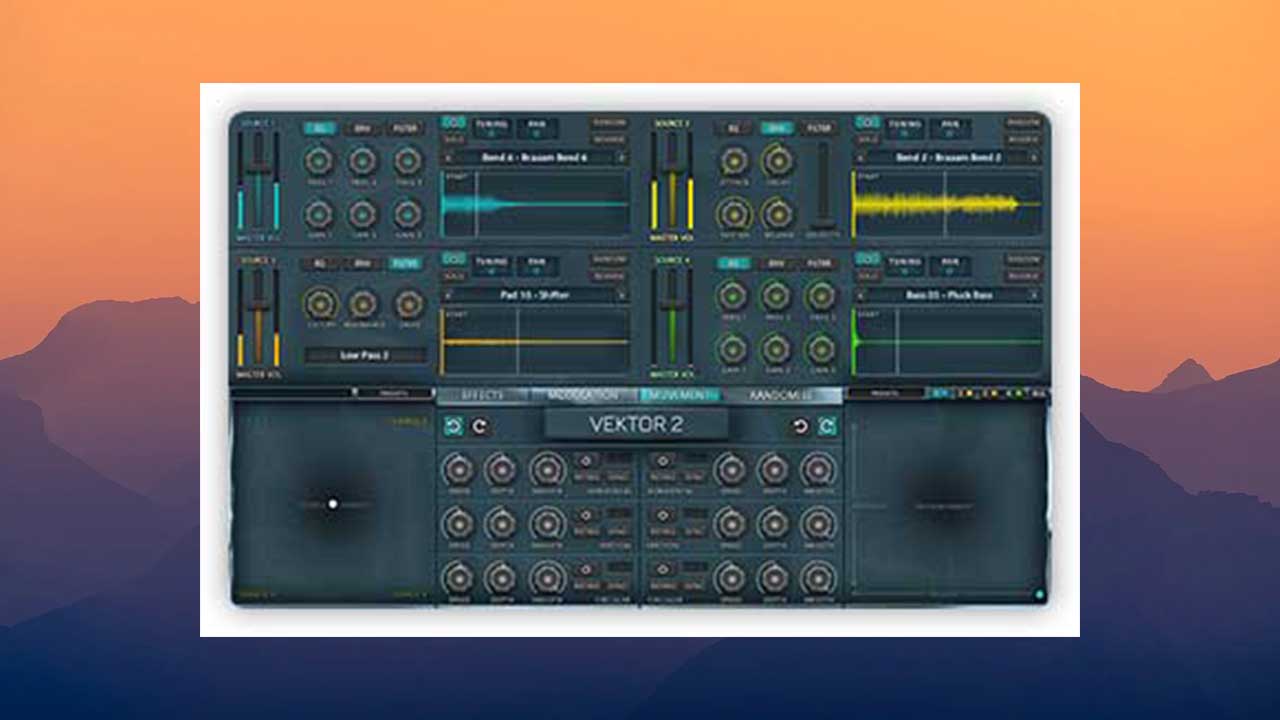
Vektor 2 offers drag-and-drop functionality: simply drag the desired sample into the source window, and the system will automatically analyze it and optimize its parameters for the selected source. It’s that simple.
Effects Panel
The Effects panel contains 9 global effects: chorus, distortion, spatial processing, stereo phaser, modified flanger, convolution reverb, filter, Replika delay, and lo-fi.
The Modulation panel
brings together all the tools for creating dynamic sound changes. Four oscillators and four envelopes are available, each assignable to a wide range of parameters.
The Filter Movement panel
allows you to control the filter cutoff frequency and resonance for each source individually or together. From smooth filter movements to complex modulations, everything is under your control.
The Source Movement panel
Allows you to dynamically and instantly transform your sound in a variety of unique ways. First, you can click and drag the white dot on the XY source movement pad to instantly blend four audio sources together. This allows you to quickly and smoothly adjust the volume of each source to the desired ratio. However, you also have the ability to manipulate the parameters, smoothly changing the blend of sounds over time. You can blend sounds horizontally, vertically (or simultaneously in both directions), as well as along a circular path. The direction of rotation can be selected – clockwise or counter-clockwise. Furthermore, the movement can be synced to the tempo of your DAW or work in free mode.
Randomization
Almost every element of Vektor 2 can be randomized in creative ways. Simply open the Randomize panel and check the boxes of the elements you want to randomize:
• Source Voices. Randomly select a sample for each source
• Source Filters. Randomize the types and parameters of all 4 source filters
• Source All. Randomize all samples and filters in sources
• Effects. Randomize effect settings in the Effects panel
• XY Motion. Randomize settings and position in the XY panel for sources
• XY Filter. Randomize settings and position in the XY panel for filters
• Modulation. Randomize parameters in the Modulation panel
• Everything. Randomize all of the above
Source Controls
The main section of Vektor 2 contains four independent sources that can be mixed to create unique sounds. Each source has separate EQ, envelope, and filter controls, accessible via buttons at the top. Each source has a master volume slider, an on/off button, and a solo button. Next to them are the pitch (+/- 36 semitones) and pan (-100/+100) controls — simply click and drag to change the values. Next comes the Random button (randomly changes the source parameters) and Reverse (reverses the current sample). Finally, you’ll find a source selection drop-down menu, and below that a sample display window showing the current waveform. Use the Start slider to adjust the sample’s starting position.
Features
• Over 140 instruments
• Over 20 presets
• 1,400 professionally crafted samples
• Modulation wheel presets
• 10 Filter Movement presets
• 10 Source Movement presets
• Filter Movement pad for controlling filter cutoff and resonance (globally or for each source)
• Source Movement pad for controlling volume balance
• Horizontal, Vertical, and Circular modules for both pads
• Modulation pad with 4 oscillators for controlling any source parameter and 4 envelope modules for dynamic parameter control
• Each of the four sound sources has independent controls (pitch, pan, envelope, EQ, filter, level, etc.)
• Solo, Power, Random, and Reverse functions for each source
• Adjustable sample start and end points
• Drag-and-drop auto-mapping with loop function
• 9 sound processing effects (chorus, reverb, delay, spatial processing, distortion, filter, phaser, flanger, and lo-fi)
• Randomize function
• Tempo sync